
The terminal UI and -p
noeta with no arguments opens a full-screen terminal UI shaped after Claude Code's; noeta -p runs one prompt without it and prints the answer, with Claude Code's headless flags and its stream-json protocol. This page covers both.
Install and start
The terminal UI is its own package, noeta-tui (in tui/), found through the entry-point group noeta.frontends under the name tui. Install it with noeta:
uv tool install --with 'noeta-tui @ git+https://github.com/initxy/noeta#subdirectory=tui' \
  'noeta @ git+https://github.com/initxy/noeta'
# from a checkout:  uv tool install '.[tui]'
Without it, noeta exits and prints the line that installs it. Then, in a project:
export NOETA_MODEL=claude-sonnet-5-5 NOETA_API_KEY=sk-ant-...
cd ~/src/my-project
noeta
The first time you open a folder, noeta asks Claude Code's question: do you trust it? "Yes" runs noeta trust for that folder (it is added to ~/.noeta/trusted.json) and loads the project's own plugins, agents, prompts, skills and settings from .noeta/. "No" quits. Until a folder is trusted those directories are left alone and a notice names each one (noeta/cli/trust.py).
The UI is a front end like any other: it runs on noeta's AppAPI (noeta/host/app.py), a LocalApp in this process, or a RemoteApp against a server with --server (below). It imports no plugin; everything it shows comes from the task's log.
Flags for a run (all in the CLI reference):
| Flag | What it does |
|---|---|
prompt (noeta "fix the tests") | Sent as the first message once the task opens (also with -c and -r ID; with -r alone it waits in the input box while you pick) |
--model NAME, --effort LEVEL | The model and effort new tasks start with (low, medium, high, xhigh, max) |
--permission-mode MODE | The starting permission mode (default auto; see permissions) |
--agent NAME | Start with another agent than main |
--cwd PATH | Work in another directory |
-c, --continue | Open the newest conversation started in this directory |
-r, --resume [ID] | Open a task by id; without one, pick from a list |
--system-prompt TEXT, --append-system-prompt TEXT | Replace, or add to, the main agent's system prompt |
--plugin-dir PATH | Load a plugin file or directory for this run only (repeatable) |
--server URL | Drive a noeta serve server's tasks instead of running them here |
The screen
The transcript fills the screen; the prompt box sits at the bottom. The footer shows the permission mode on the left, and the model, how full the context is (or how far it is from the automatic compaction), the cost so far and the directory on the right. Tool calls show as one line each and fold their output; a run of reads groups into one line. ? on an empty prompt shows the shortcuts.
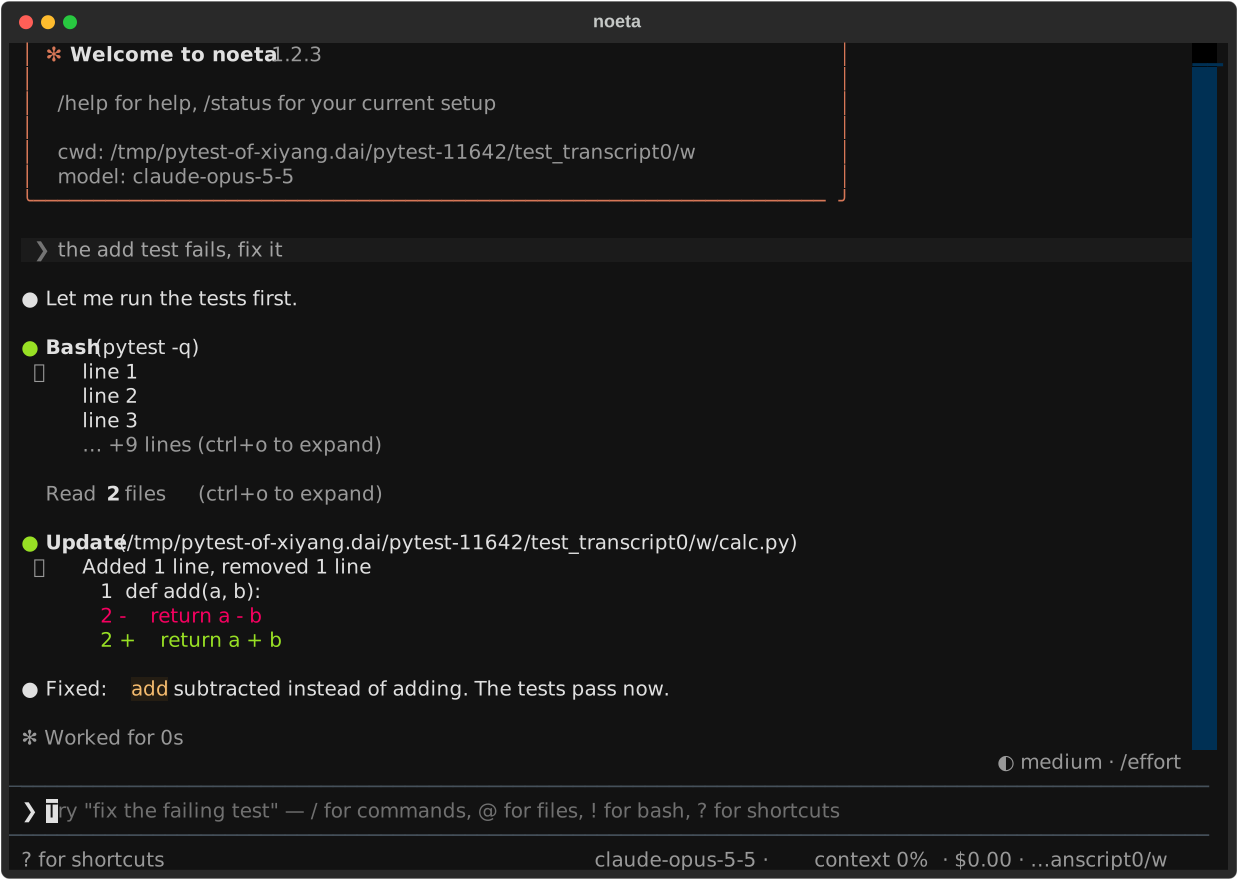
A new screen creates its task only when you send the first message, so a start, /clear or /new you type nothing after leaves no empty task behind (as Claude Code saves a session only from its first message).
Keys
| Key | What it does |
|---|---|
Enter | Send |
\ then Enter, or Ctrl+J | New line |
Esc | Stop the turn (the task keeps everything said so far) |
Esc Esc | Clear the input; on an empty input, open /rewind |
Ctrl+C | Clear the input; on an empty input, press twice to quit |
Shift+Tab | Step to the next permission mode |
↑ / ↓ | Earlier prompts (from the first or last line of the box) |
Ctrl+R | Search earlier prompts; Enter puts the pick in the box, Esc leaves it empty |
Ctrl+O | Unfold every tool call's output (and fold it again) |
Ctrl+T | Show or hide the task list (the todos) |
Ctrl+B | Show or hide the side panel of sub-agents |
Ctrl+V | Attach the image on the clipboard (needs wl-paste, xclip or pngpaste) |
? | Show the shortcuts (on an empty prompt) |
Two presses count as a double press within 0.8 seconds (DOUBLE_PRESS in tui/src/noeta_tui/app.py).
Shift+Tab steps through the modes the task's permissions plugin publishes, in Claude Code's order: default → acceptEdits → plan → auto → bypassPermissions (a server or worker started without --allow-bypass-permissions leaves bypassPermissions out, and plan is there only with the plan-mode plugin). dontAsk is set only by configuration.
Approvals and questions
When a tool call needs your yes, the transcript shows a card: what would run (an edit shows its diff), "Do you want to proceed?" and numbered choices, the same ones Claude Code offers (yes; yes and always allow the rule the card names; yes and switch mode; no). Keys on a card: the digit of a choice, y / a / n, Esc for no. Tab on Yes or No opens a line for what you want to add: with a no it becomes the reason the model reads, with a yes words it reads beside the call's result.
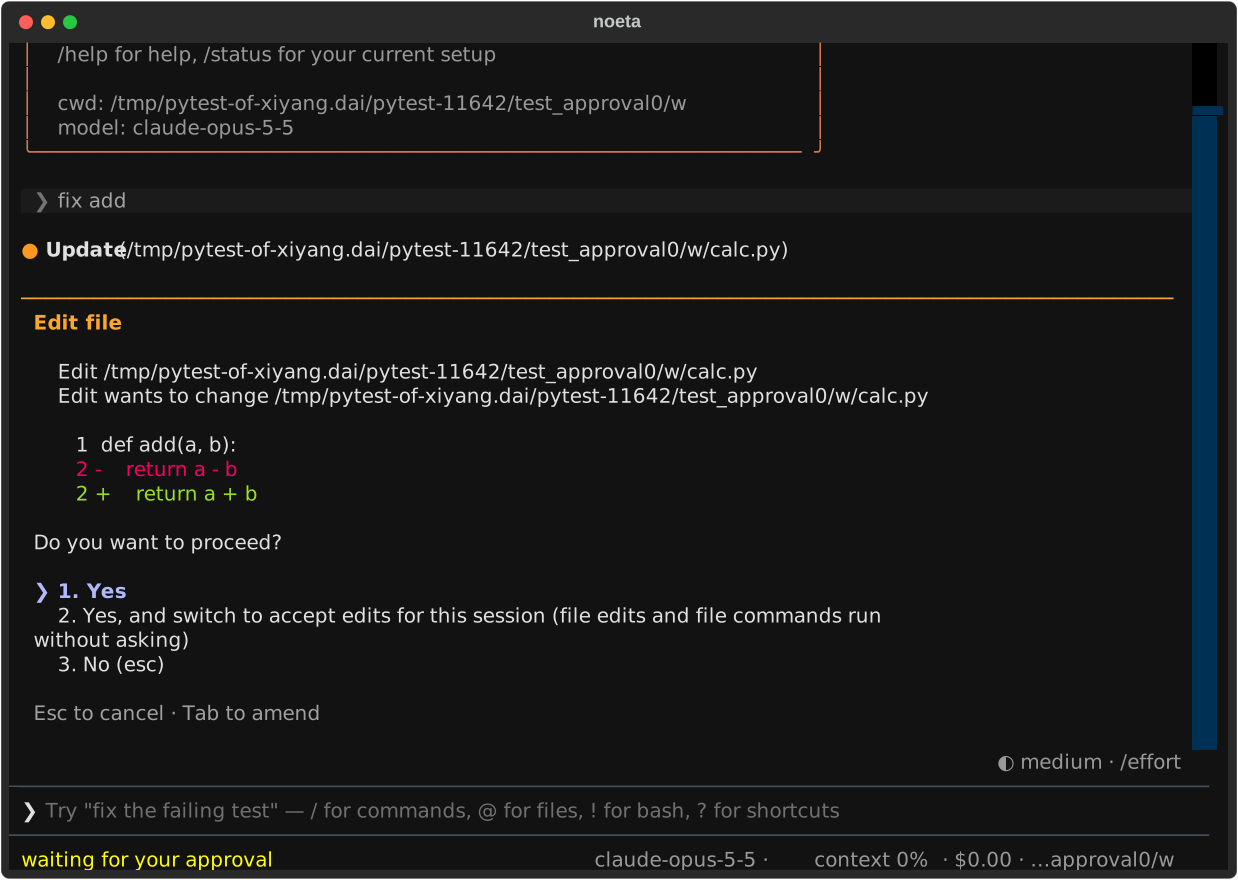
A question from the model (AskUserQuestion) shows its options; type the answer, or the number of an option (2, or 1, 3 for several). A question with several parts asks them one by one.
While the task waits for you it holds no worker: the approval is a parked call, and closing the terminal leaves it waiting. Open the task again (noeta -c) and the card is shown again.
What you can type
Slash commands
/ at the start of the box opens a menu of commands, filtered as you type; Enter runs the highlighted one. The terminal UI's own commands (tui/src/noeta_tui/slash.py):
| Command | What it does |
|---|---|
/help | The shortcuts and every command, plugins' included |
/status | Version, task, agent, model, permission mode, directory, settings |
/model [name] | Pick or set the model, from the next request on (models) |
/effort [level] | Pick or set the effort: low, medium, high, xhigh, max |
/context | What fills the next request, as a grid |
/cost | Tokens and cost of this task and its sub-agents |
/memory [n] | The instruction and memory files; /memory 2 opens the second in $EDITOR |
/config [edit user|project|local] | The settings; edit opens ~/.noeta/settings.json, .noeta/settings.json or .noeta/settings.local.json |
/permissions | The permission mode, the cycle and the rules from the settings files |
/agents | The agents this front end runs |
/mcp | The MCP servers: connected, failed, or waiting for a sign-in |
/hooks | The hooks configured (read-only) |
/rewind [n] [both|conversation|code] | Go back to before a prompt (rewind) |
/clear, /new | Start a new task |
/resume [n|id] | Pick a task to resume |
/stop | Stop the turn (as Esc) |
/reload-plugins | Load plugin, agent and settings files again, in effect from the next turn (a changed env, model, agent or sandbox needs a restart, and the UI says so) |
/exit, /quit | Quit |
Everything else in the menu comes from the agent's plugins, and runs the same way in every front end (noeta/core/commands.py):
| Command | From |
|---|---|
/compact [instructions] | the compaction plugin: summarize the conversation now |
/plan [request] | the plan_mode plugin: switch to plan mode, and plan the request if given |
/loop [interval] prompt | the schedule plugin: run a prompt on an interval |
/init, /review [PR | branch | paths] | the markdown_commands plugin: write a NOETA.md; review changes |
/<skill> | every skill a person may invoke (skills) |
/<plugin>:<command> | a Claude Code plugin's commands/*.md |
/mcp__<server>__<prompt> | an MCP server's prompts |
A command either shows something here and sends nothing (a "local" command), or expands into text that goes to the model as your message.
@ file mentions
@ followed by part of a path offers the files and directories under the task's directory whose path contains what you typed: names that start with it first, then shorter paths (at most 15, from at most 5,000 paths; .git, node_modules, virtual envs, dist, build and hidden directories are skipped; tui/src/noeta_tui/files.py). Tab or Enter completes it.
The mention is attached inside the task, through Read, where the task's files are (the file tools plugin, noeta/plugins/fs/mentions.py), so a mentioned file goes through the same permission checks as a read by the model. Completion is off with --server: the files are on the server.
! bash mode
A prompt that starts with ! runs the rest as a shell command here, in the task's directory, with no model involved: the prompt marker turns pink, the output shows in the transcript, and it goes with your next message in Claude Code's tags, so the model sees what you ran:
<bash-input>git status</bash-input>
<bash-stdout>…</bash-stdout><bash-stderr>…</bash-stderr>
A command may run 120 seconds; the next message carries at most 30,000 characters of each stream (tui/src/noeta_tui/bash_mode.py). Bash mode does not go through the permission checks: you typed the command. It is refused with --server, since the task's files are on the server.
When a command needs you at the keyboard (an interactive login such as gcloud auth login), the model asks you to type it as ! <command>, as Claude Code does: the terminal UI marks the tasks it creates bash_mode: true, and only those get that line of the main prompt (not with --server).
Images
Ctrl+V attaches the clipboard's image; pasting the absolute path of an image file attaches that file (PNG, JPEG, GIF, WebP). The box shows [Image #1] and the image goes with the next message.
History, continuing and resuming
Every prompt you send is added to the project's history file, ~/.noeta/projects/<project>/history.jsonl (one {"text", "at"} per line, as Claude Code keeps its history; the newest 100 are kept; tui/src/noeta_tui/history.py). ↑ and Ctrl+R read it, so prompts from earlier runs are there too.
Tasks themselves are kept in the store (~/.noeta/tasks.db by default), so any conversation can be opened again:
noeta -c              # the newest conversation started in this directory
noeta -r              # open the newest task and offer the others (the newest 10, by first prompt)
noeta -r 3f9c…        # a task by id
noeta -c with nothing to continue prints No conversation found to continue and exits with code 1, as Claude Code does. Inside the UI, /resume offers the same list.
Opening a task again tells its plugins it was resumed (a resumed signal: SessionStart hooks see resume), and a task a headless run started becomes one a person follows (it gets a title and may ask questions). A task you cannot run here (its agent is not one this front end runs) opens read-only, with its history.
Attach to a server
export NOETA_SERVER_TOKEN=...             # the token noeta serve printed
noeta --server http://api.internal:8642
The UI then drives that server's tasks over HTTP. It needs no model of its own: a new task runs on the server's model and in the server's directory, unless --model names a model or --cwd PATH names a directory on the server. --plugin-dir, ! bash mode and @ completion are not available there; /reload-plugins says to restart the workers instead. See the server guide and front ends.
-p: one prompt, no UI
noeta -p "what does this repository do?"
git diff | noeta -p "review this diff"        # the prompt from stdin
noeta -p --output-format json "list the TODOs" | jq .result
-p (--print) runs the task in this process, prints the answer and exits with code 0, or 1 when the run ended in an error. It always runs here: -p with --server is refused. Its task is not interactive: it gets no title, and AskUserQuestion is not offered unless a client answers prompts. Anything that would ask for permission is refused and the turn goes on, as in Claude Code's headless mode, so give it the permissions it needs up front:
noeta -p --allowedTools "Bash(npm test) Edit" "make the failing test pass"
noeta -p --permission-mode acceptEdits "fix the lint errors"
The flags are Claude Code's (noeta/cli/headless.py):
| Flag | What it does |
|---|---|
--output-format text|json|stream-json | What is printed (below) |
--input-format text|stream-json | Read a prompt, or a stream of messages, from stdin |
--verbose | Required with --output-format stream-json |
--include-partial-messages | Also stream the model's output as it is written (stream_event) |
--replay-user-messages | Echo the user messages taken back on stdout |
--max-turns N | Model calls per turn, at most |
--max-budget-usd X | Stop once the task tree has cost this much |
--json-schema SCHEMA | Answer through a StructuredOutput tool matching this JSON Schema (root "type": "object") |
--allowedTools, --disallowedTools | Allow and deny rules ("Bash(git *) Edit"); a bare name in --disallowedTools also takes the tool away |
--tools | The tools offered (default: all; "": none) |
--add-dir DIR | More directories the file tools may use |
--permission-mode MODE, --dangerously-skip-permissions | The mode; the second is bypassPermissions |
--permission-prompt-tool stdio|mcp__server__tool | Who answers permission prompts: the client (can_use_tool requests) or an MCP tool |
--permission-prompts host|none | none: no prompt is answered by anyone, even with the flag above |
-c, -r ID, --fork-session | Continue the newest task here, a given one, or go on in a new task copied from it |
--session-id ID | The id the new task gets |
--agent NAME, --agents JSON | The agent to run; extra sub-agents as Claude Code's JSON object |
--settings FILE|JSON, --setting-sources user,project,local | A settings layer above the project's; which settings files are read |
--mcp-config FILE|JSON, --strict-mcp-config | MCP servers for this run; with the second, only those |
--system-prompt-file, --append-system-prompt-file | The system prompt (or what follows it) from a file |
--plugin-dir PATH | A plugin for this run only |
Flags Claude Code has and noeta does not use (--betas, --fallback-model, --max-thinking-tokens, --include-hook-events, --bare, …) are accepted and ignored, each named on stderr, so a command line written for Claude Code runs unchanged.
Output formats
text(the default): the final answer on stdout; on an error, the errors on stderr.json: one result object, Claude Code's:type: "result",subtype(success,error_max_turns,error_max_budget_usd,error_max_structured_output_retries,error_during_execution),is_error,result(the answer's text),session_id(the task id),duration_ms,duration_api_ms,num_turns,total_cost_usd,usage,modelUsage(per model, with its context window),permission_denials,stop_reason, andstructured_outputwith--json-schema.stream-json(with--verbose): one JSON object per line as the task runs.
noeta -p --output-format stream-json --verbose "count the Python files" | jq -c '{type, subtype}'The stream-json protocol
With --input-format stream-json --output-format stream-json --verbose, stdin and stdout carry Claude Code's SDK protocol (noeta/host/stream_json.py); the same protocol is served on a server as the /stream-json WebSocket. The root task's id is the protocol's session_id.
What comes in:
usermessages: text or content blocks; a/commandruns as typed.control_requests:initialize(with the client's hook callbacks),interrupt,set_permission_mode,set_model,set_max_thinking_tokens(accepted, no effect),rewind_files,get_context_usage,get_session_cost,list_models,mcp_status.control_responses to noeta's owncan_use_toolrequests, when the client answers permission prompts (--permission-prompt-tool stdio).
What goes out:
system/initfirst: directory, tools, model, permission mode, slash commands, agents.- An
assistantmessage per model reply; ausermessage per tool result;tool_progresswhile a tool runs. stream_events (Anthropic's streaming events) with--include-partial-messages.systemnotes:compact_boundary,task_startedandtask_notification(sub-agents),status,local_command_output,informational.- A
resultwhen a prompt's work is done, as in thejsonformat.
Driving it from Claude Code's Agent SDK
Because noeta speaks the protocol and accepts Claude Code's flags, a program written for Claude Code's Agent SDK can run noeta in its place: point the SDK's executable at noeta (ClaudeAgentOptions(cli_path=...) in the Python SDK, pathToClaudeCodeExecutable in TypeScript). The SDK starts it with --output-format stream-json --verbose --input-format stream-json and its other flags; noeta reads the flags it knows and names the ones it ignores on stderr.
from claude_agent_sdk import ClaudeAgentOptions, query

options = ClaudeAgentOptions(cli_path="/home/me/.local/bin/noeta", allowed_tools=["Read", "Bash"])
async for message in query(prompt="What does this repository do?", options=options):
    print(message)
The model, provider and key come from noeta's own settings (NOETA_MODEL, NOETA_API_KEY, ~/.noeta/config.toml), not from the SDK's environment for Claude Code. Hook callbacks the SDK registers in initialize run as callback hooks, and a can_use_tool callback answers permission prompts.